I spent years running my painting business before I actually knew how much money I was making.
Sure, I could see the revenue coming in. Invoices got paid. The bank account went up (sometimes). But I had no bloody idea which jobs were worth doing and which ones were costing me money.
Then I started tracking profit per hour on every job. Game changer.
Here's the exact formula I use, two worked examples, and a free spreadsheet template you can download.
Why Profit Per Hour Matters More Than Total Profit
Let's say you do two jobs in the same month:
- Job A: $3,500 invoice, $1,200 profit
- Job B: $1,800 invoice, $1,400 profit
Which job was better?
Most tradies would say Job A. Bigger invoice, more profit. But here's the thing: you're not just selling your work, you're selling your time.
If Job A took 40 hours and Job B took 12 hours, your profit per hour tells a different story:
- Job A: $1,200 ÷ 40 hours = $30/hour
- Job B: $1,400 ÷ 12 hours = $116/hour
Job B made you nearly 4x more per hour. That's the work you should be quoting more of.
💡 The Key Insight
You can't work more hours (there's only 24 in a day). But you can choose which work pays you the most per hour. That's how you actually grow your income without burning out.
The Simple Formula for Profit Per Hour
Here's the formula I use. Dead simple, no fancy accounting software needed:
Job Price is pre-GST. Total Hours includes all time on site + prep + cleanup.
Breaking it down:
- Job Price: What you charged the customer (excluding GST)
- Materials Cost: Paint, brushes, drop sheets, tape, everything you bought for that job
- Total Hours Worked: Every hour you spent on the job (on-site work + prep + cleanup + travel if it's significant)
What this tells you: How much profit you made for every hour you worked on that job, after covering materials.
Want to skip the maths? Use the free job return calculator. Enter one job's price, materials, costs and every hour, and it shows what that job really paid you per hour. No signup, nothing saved.
Worked examples from a painting business
Here are two example jobs (worked-example figures for teaching the formula; confirm against your own records). Wildly different profit per hour.
Job took way longer than expected. Lots of patching and prep work. Customer added extra rooms halfway through. Materials cost blew out because I underestimated ceiling paint.
On a 4-bedroom interior repaint I made about $65 an hour once paint and materials came out. My other work was coming in at about $100 an hour.
The takeaway: The 4-bedroom interior repaint paid me about $65 an hour against about $100 an hour on my other work. That's about a third less per hour. Without tracking this, I would have kept quoting more interior repaints and wondered why I was working so hard for average money.
⚠️ Common Mistake
Don't just track "total profit" on a job. A $2,000 profit job that takes 50 hours ($40/hr) is worse than a $1,200 profit job that takes 10 hours ($120/hr). Track the hourly rate.
What's a "Good" Profit Per Hour?
This depends on your location, trade, and experience level. But here's a rough guide for Australian painters (as of 2026):
- Under $50/hr: You're probably losing money or barely breaking even when you factor in overheads, time off, and tax.
- $50-$80/hr: Decent. You're making a living, but there's room to improve your quoting.
- $80-$120/hr: Good. This is where most experienced sole traders should aim.
- $120+/hr: Excellent. You're quoting well, working efficiently, and choosing the right jobs.
How I Track This in Trackexa
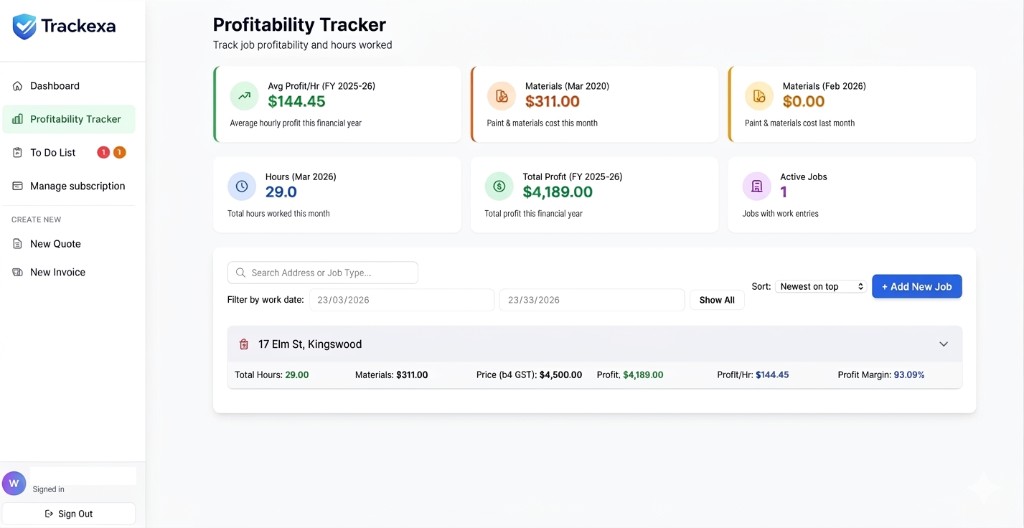
I got sick of updating spreadsheets, so I built profit tracking into Trackexa (the job management software I use for my painting business).
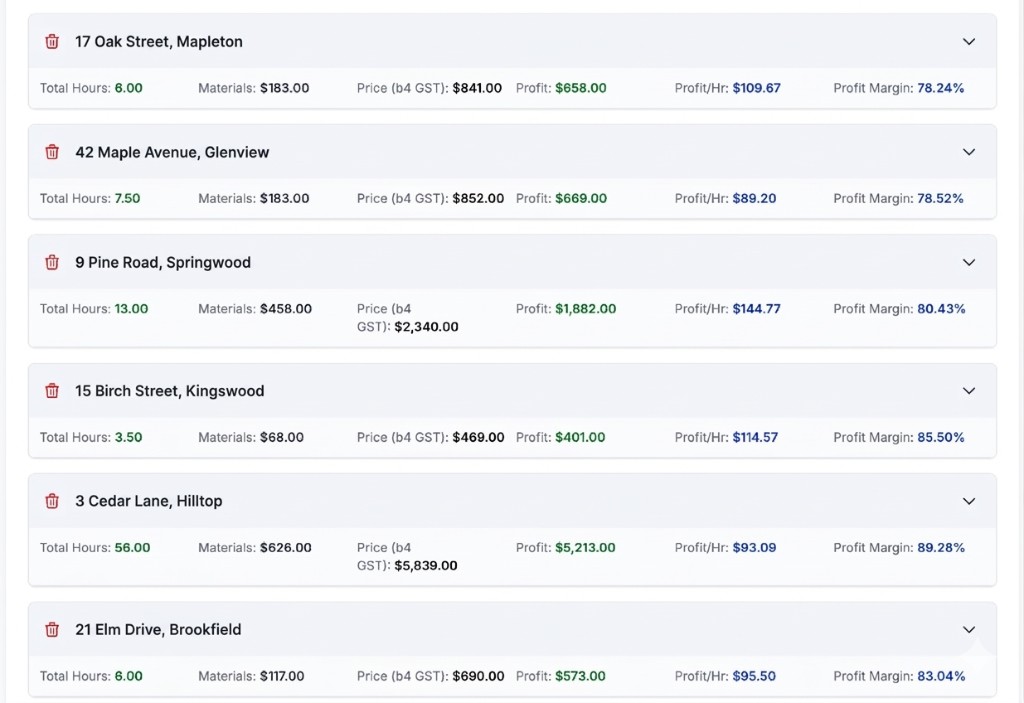
My profit tracker (demo data): every job shows materials, hours, profit, and profit/hr
Here's how it works:
- Add the job: Enter job address, type, and quoted price (takes 30 seconds)
- Track materials + hours: Log materials cost and work entries as you go (or all at once when the job finishes)
- See profit per hour instantly: Trackexa calculates total hours, profit, profit per hour, and margin automatically
No spreadsheets. No formulas. Just add your data and see your numbers.
✅ Why This Changed My Quoting
Once I started tracking profit per hour, I adjusted the price on work that paid poorly. I realized interior repaints with lots of prep were killing my hourly rate. Now I focus on adding more money on those jobs so I can make a better hourly rate. And I kept doing the same on my other work, which was already returning around $100 an hour.
Free Profit Per Hour Spreadsheet Template
If you're not ready for job management software yet, here's a simple spreadsheet template you can use:
📊 Spreadsheet Columns You Need:
- Job Name: e.g., "4-bed interior repaint"
- Job Price (ex. GST): What you charged
- Materials Cost: Total materials for that job
- Total Hours: All time spent on the job
- Profit: Formula: Job Price − Materials Cost
- Profit Per Hour: Formula: Profit ÷ Total Hours
Here's the Free Profit Per Hour Spreadsheet Template download. Takes 2 minutes per job, but you'll spot patterns fast.
What to Do With This Data
Once you start tracking profit per hour, here's how to use it:
1. Quote More of the High-Profit Work
Look at your last 10 jobs. Which ones had the highest profit per hour? Those are the jobs you should be marketing and quoting more of.
In this example set, exterior work paid better per hour. Your mix will differ.
2. Avoid (or Re-Price) the Low-Profit Work
If a type of job consistently pays under $60/hr, either stop quoting it or charge more.
I used to quote and do small bathroom repaints. Profit per hour was terrible ($40-50/hr) because of all the prep. Now I either charge $100+ per hour or don't take the job.
3. Improve Your Efficiency on Mid-Range Jobs
Some jobs are worth doing, but your profit per hour is lower than it should be because you're slow or inefficient.
Track your time honestly. If a job consistently takes longer than expected, figure out why and fix it.
Track Your Profit Per Hour Automatically
Trackexa calculates profit, profit per hour, and margin on every job. No spreadsheets, no maths. See which work is actually making you money.
Try Trackexa Free for 14 Days →Next: use this to price your next job. See how to price a painting job in Australia.
Try the Smoko Challenge: which job returned the most per hour?
Final Thoughts
Tracking profit per hour is the single most important number I watch in my painting business. Not total revenue. Not even total profit. Profit per hour tells me which work is worth doing.
If you take one thing from this article: start tracking your time and materials on every job. Even if you do it in a notebook or a basic spreadsheet, you'll spot patterns that change how you quote.
And if you want it done automatically, Trackexa does all the math for you. Built by a tradie (me), for tradies like you.
Cheers,
Joel